Buy USDT With Bank Transfer: 6 Steps, and the 1 Button You Must Not Press After Paying
Buying USDT from a stranger by bank transfer sounds like a bad idea. The flow that makes it workable: their USDT locks first, you pay, mark paid, they release. Plus how it compares with an exchange or a DM dealer.
You want 500 USDT. Someone online will sell it to you for a bank transfer, and you have read enough stories to be nervous. What if you send the money and they disappear? That fear is reasonable, and it has a specific answer. When you buy USDT with bank transfer on a P2P escrow marketplace, the seller's USDT is locked before you send a single penny, and they cannot take it back while your payment is on its way. This guide walks through the whole flow from the buyer's seat.
P2P vs an exchange vs a DM dealer: who holds the USDT while you pay
To buy USDT peer to peer means buying from another user, not from the platform. LetsEscrow does not sell you USDT and does not receive your bank transfer. The money goes straight from your bank account to the seller's.
Person-to-person crypto is mostly stablecoins these days. Chainalysis's 2026 Global Crypto Adoption Index found that value moving directly between personal wallets inside countries rose 302.9% to $228.7 billion, and that this peer-to-peer activity is now 96% stablecoins. Nigeria ranked first of 117 countries for its P2P economy (Chainalysis, 2026).
What LetsEscrow does is hold the seller's side. Their USDT sits in their LetsEscrow wallet, and when you open a trade, the amount you are buying moves from their available balance to locked. If they don't have enough, the trade cannot open. So by the time you see an open trade, the USDT is already set aside for you.
Three things follow from that:
- The seller cannot spend or withdraw the locked USDT while the trade is open.
- Only the seller, or a moderator in a dispute, can release it to you.
- The seller has no cancel button. Once your trade is open, their options are to release or to dispute.
For the general mechanics behind this, see how P2P crypto escrow works.
The risk you are guarding against has a name in the FBI's statistics: non-delivery, meaning payment sent and nothing received. Together with its mirror image, non-payment, it drew 56,478 complaints and $503,373,587 in reported losses in 2025 (FBI IC3, 2025). Here is how the usual ways to buy USDT handle it.
| How you buy | Who holds the USDT while your transfer clears | ID to start | If you pay and get nothing | Where it is actually fine |
|---|---|---|---|---|
| A centralised exchange, by bank deposit | The exchange | Usually a full ID check first | The exchange's own support process | You are happy to verify, and an exchange serves your country and your bank |
| A stranger on social media or in a DM | The stranger | None | Usually nothing you can do | Not with a stranger |
| A friend-of-a-friend dealer | The dealer | None | Depends on the dealer, and the friendship | Small amounts with someone your circle has used for years |
| A P2P escrow marketplace (LetsEscrow) | Locked on the platform. Only the seller or a moderator can release it | Email only, up to a default $1,000 per rolling 30 days | Open a dispute with your bank statement. A moderator can release the USDT to you | Strangers, everyday amounts, a local bank transfer |
The verdict: if an exchange serves your country and you don't mind verifying, it is often the simplest route. Buying from a person is where the lock earns its keep, because a great rate from a stranger in a DM is still a stranger.

How to buy USDT with bank transfer in 6 steps
- Pick a listing. Filter the crypto-for-cash marketplace for bank transfer and your currency. Read the terms before anything else (more on that below).
- Open the trade. Enter how much you want. The seller's USDT for that amount locks and the countdown starts.
- Get the payment details. The seller shares their bank details in the trade chat using its payment-details message. Pay only to the account given there.
- Send the bank transfer. Use the exact amount and, if the terms ask for one, the reference they specify.
- Mark as paid. Back in the trade, mark it as paid and add your bank's reference number. A screenshot of the transfer is optional but helpful.
- The seller checks and releases. They look at their own bank account, see the money, and release. The USDT, minus your half of the platform fee, lands in your LetsEscrow wallet.
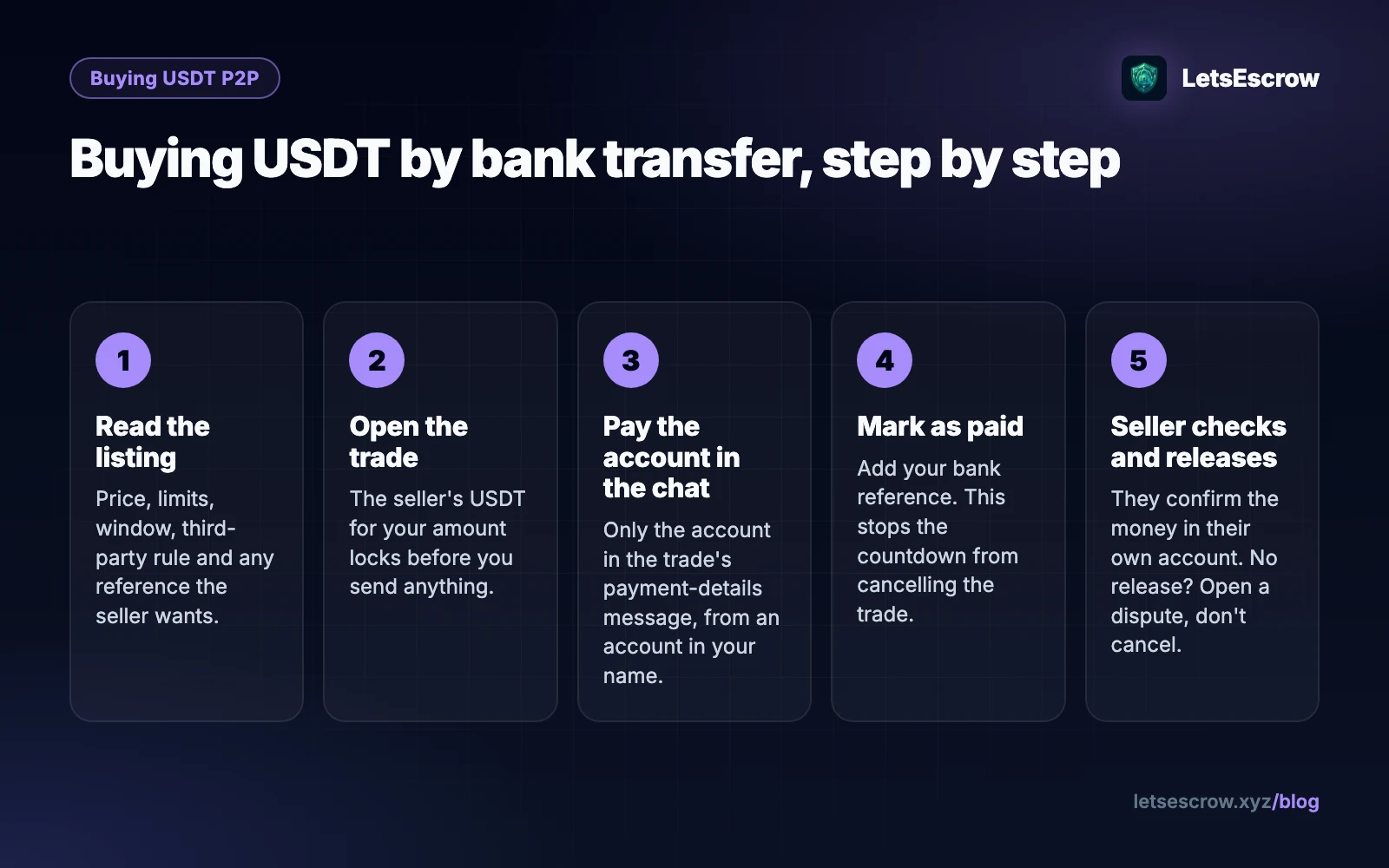
Marking as paid moves the trade to review and posts a message telling the seller to check their account. It also stops the countdown from cancelling the trade, which protects you while a transfer clears.
Only mark as paid after the money has actually left your account. Marking early to stop the clock gives the seller a fair reason to dispute, and a moderator will see the timestamps.
Want to see the trade screen before you use real money? Practice a trade in the simulator.
Reading a bank transfer listing: 7 fields to check before you open a trade
Before you buy USDT with bank transfer, read the listing. It tells you most of what can go wrong before you open a trade, and the same checks apply whether you buy USDT with bank transfer in Nigeria, India or the UK; only the currency and the bank's clearing time change. Check each of these:
| Field | What to check |
|---|---|
| Price per USDT | Set in the seller's chosen currency. Compare a few listings. |
| Minimum and maximum | Your amount has to fall inside both. |
| Payment method | Bank transfer covers local transfers and wires. Make sure yours is the kind the seller accepts. |
| Payment window | Anything from 5 minutes to 24 hours. Pick one longer than your bank needs. |
| Third-party payments | Whether the seller accepts money from an account in someone else's name. |
| Country restriction | Some listings trade only with certain countries. |
| Terms | Reference format, business hours, anything else the seller requires. |
Then look at the seller's profile: completed trades, rating, trusted-by count and whether they are online now. A seller who was active in the last five minutes is more likely to release while you are still at your desk. You can browse current bank transfer offers for crypto to compare prices and windows.
The name-match rule: why "my friend will pay" gets refused
Each bank transfer listing has a setting for whether it accepts third-party payments. A third-party payment is one that comes from an account in a different name from the buyer's: a friend's account, a relative's, sometimes a company's.
Sellers care because of one risk escrow cannot remove. A bank transfer can sometimes be recalled or reversed by the sender's bank after the seller has released. Escrow protects the crypto side of the trade, not the bank side. Payments from strangers' accounts are a common pattern in that kind of fraud, so many sellers refuse them.
If a listing does not accept third-party payments, pay from a bank account in your own name. If you send from someone else's account anyway, the seller can refuse to release and open a dispute, and you will spend time getting your money back from them instead of receiving your USDT.
After you pay: the seller has 2 moves, and you have 1 button to leave alone
Once you have paid and marked the trade as paid, the seller has two choices:
- Release, after checking that the money is in their account.
- Open a dispute, for example "payment not received" if it hasn't arrived, or "chargeback or reversed payment" if it came back.
They cannot cancel and walk off with the locked USDT. Neither can they release it to anyone but you.
Now the part that catches buyers out. In this kind of trade, you are the one with the cancel button. Cancelling sends the locked USDT back to the seller. So if you have already sent your bank transfer, do not press cancel, whatever the seller tells you. If someone asks you to cancel "so I can reopen it" after you have paid, treat it as a red flag and open a dispute instead.
If the seller doesn't release
Give them reasonable time, especially if transfers in your country take a while to arrive. Then ask in the trade chat. If you get silence or excuses, open a dispute with the unresponsive-counterparty reason. The trade freezes, and a moderator reviews the chat, your reference number, your screenshot and the timestamps. They can release the USDT to you, refund it to the seller, or split it. There is no promised response time, so add your evidence straight away: a bank statement line showing the payment out is stronger than a screenshot of the transfer screen.
Timing: the window, auto-expiry and the 60-minute reopen
The countdown starts when the trade opens. The seller set its length on the listing, between 5 minutes and 24 hours.
If you have not marked the trade as paid when it ends, the trade cancels and the USDT goes back to the seller's available balance. That is the system working as intended: it stops a seller's USDT being stuck indefinitely by a buyer who wandered off.
If you were simply slow, the trade may still be recoverable. Either side can reopen an expired trade within the listing's reopen window, 60 minutes by default, if the listing allows reopening and the seller still has the balance. The countdown starts again. But if you have already sent the money when the trade expires, don't wait: message the seller, reopen at once and mark it paid, so the transfer is attached to a live trade.
The simplest fix is prevention. Choose a window longer than your bank's usual transfer time, and have your banking app open before you open the trade.
Worked example (illustrative): 500 USDT, £400, 1 reference number
The names and prices below are invented to show the steps.
Folake lives in London and wants 500 USDT to pay a freelance developer. She finds a bank transfer listing priced at 0.80 GBP per USDT, minimum £50, maximum £1,000, a 60-minute window, no third-party payments, and a note: "Put the trade ID in the reference."
- She opens a trade for 500 USDT, which is £400. The seller's 500 USDT plus their half of the fee locks.
- The seller posts their account details using the chat's payment-details message.
- Folake sends £400 from her own account with the trade ID as the reference, then marks the trade as paid with her bank's reference number and a screenshot.
- Twenty minutes later the seller sees £400 arrive and releases. Folake's wallet shows 500 USDT minus her half of the fee.
- She keeps it there to fund her next trade, the freelance job, in the way described in the guide to paying a freelancer without paying upfront.
After release: keep it, swap it or withdraw it
Your USDT is now in your LetsEscrow wallet. You can keep it there for your next trade, or withdraw it to your own wallet. Withdrawals carry a fee for that crypto, shown before you confirm, and staff process them and record the transaction hash.
If the seller sold you USDT on a network your wallet doesn't use, swap it inside your LetsEscrow wallet first. USDT swaps between TRC20 and BEP20 one-for-one.
FAQ
Is it safe to buy USDT with a bank transfer?
It is much less risky when the seller's USDT is locked before you pay, you pay only to the account given in the trade chat, and you send from your own account. No method removes every risk, so keep your bank statement until the trade is complete.
What if I pay and the seller doesn't release?
Don't cancel, because cancelling returns the USDT to the seller. Ask in the trade chat, then open a dispute with your bank reference and statement. A moderator can release the USDT to you.
Can I pay from my business account?
Only if the listing accepts third-party payments or the seller agrees in the chat before you send. If the business name differs from yours, treat it as a third-party payment.
What is the cheapest way to buy USDT?
There is no single answer. Compare the price per USDT across listings, since each seller sets their own; the platform fee is split evenly and shown before you confirm; and your bank may charge for the transfer. A listing with a slightly higher price and a seller who is online now can still be the better deal.
Do I need ID to buy USDT P2P?
Not for everyday amounts. An account with nothing but a confirmed email can complete $1,000 of trades per rolling 30 days by default. Higher limits open up step by step, and staff can ask for verification if a trade looks suspicious.
Should I buy USDT TRC20 or BEP20 with a bank transfer?
Either. They are the same USDT on two different networks: TRC20 runs on TRON, BEP20 on BNB Smart Chain. Your withdrawal address has to be on the matching network. Inside LetsEscrow you can swap between them one-for-one.
When you're ready, see bank transfer offers for USDT and compare windows and terms, or open a free account first.
LetsEscrow is a peer-to-peer escrow marketplace, not a bank, law firm or licensed escrow agent. Check the rules that apply where you live.